Project Hamster is probably the best Linux time tracker out there.
But there is a small problem. It is written to be used as Gnome panel applet. I guess that some things will change with Gnome 3 (maybe it will get better Gnome shell integration or something?) but the lead developer has written that there will be no tray icon for Hamster:
generally though the system or notification tray is the no-go zone and one that triggered all the shunning in the panels (too many icons behaving too differently etc).
I found that there is script to use it with Ubuntu’s indicator applet but could not find one for system tray.
So I did it myself.

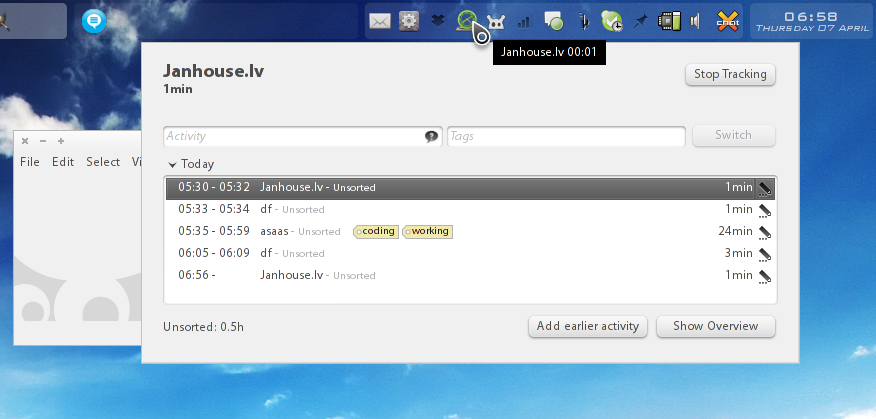
I modified hamster-appindicator script by Alberto Milone to work with system tray (instead of appindicator). It now behaves similar to the panel applet. Only noticeable difference is that you don’t see current running task name and time in the tray (because there is only an icon and no text) and how long it has been running, but you can see it in the tooltip of the tray icon.
To make it more usable, I have included green and red icons that are used to indicate running task (by default I made it use green icon but you can change it in the script).
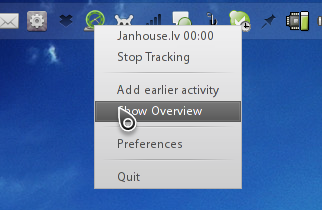
Left mouse click toggles tracker window, right click shows menu.
Icons and script can be downloaded from https://bitbucket.org/janhouse/hamster-tray/downloads .
- Copy icons to /usr/share/icons/ or ~/.icons/
- Install latest Hamster (I tested it with latest git version): http://projecthamster.wordpress.com/building-and-running/
- Get latest hamster-tray version from https://bitbucket.org/janhouse/hamster-tray/downloads
- make it executable and run it
I’l later make hamster-tray PKGBUILD for Archlinux and put it on AUR.
If you want to point out any errors (it probably has some since I was making it in rush in the middle of the night) leave a comment. I’l try to update it at some point.
P.S. YAY! I can use Hamster again! 🙂
UPDATE:
08.04.2011.
After upgrading my Archlinux today I noticed that it did not work anymore because upgrade contained Gnome3 stuff.
So the error was:
$ hamster-tray
Traceback (most recent call last):
  File "/usr/local/bin/hamster-tray", line 51, in <module>
    from hamster.applet import HamsterApplet
  File "/usr/lib/python2.7/site-packages/hamster/applet.py", line 29, in <module>
    import gnomeapplet
ImportError: libpanel-applet-2.so.0: cannot open shared object file: No such file or directory
Quick dirty fix for the moment is to edit applet.py and remove line:
import gnomeapplet
This will probably make it not work as Gnome 2 panel applet but I guess that those applets are removed from Gnome3 anyway.
This is just a temporary fix and I will try to completely rewrite this script as soon as I get some time.


Awesome!
But, if it uses ubuntu indicator, how will you build it for ArchLinux? You have to know that Hamster does not uses that indicator right now.
First of all my code doesn’t use indicator. It uses system tray so it can be used with anything.
Well, I guess you need gnome panel stuff installed (they probably are dependencies for Hamster or something) but you don’t have to run them to use this.
And Ubuntu’s appindicator is available on Archlinux if you are using Gnome. More information about that can be found here: https://bbs.archlinux.org/viewtopic.php?id=99746&p=1
Hi there,
Very nice! I have been wondering why Hamster doesn’t go in the system tray by default.
On Fedora 14 I had to replace all hamster.lib with just hamster and then your script runs fine for me =)
Thank you!
Yeah, when I tired with git version I had to replace all hamster with hamster.lib 😀
Hey, what’s that desktop environment? Looks pretty slick 🙂
It is Openbox with tint2 panel/tray, Orta GTK2 theme and Gruppled cursor theme (http://gnome-look.org/content/show.php/Gruppled+Cursors?content=86081)
FYI, Gnome Panel is still present if Gnome 3 – however, I believe they’ve dropped support for the old bonobo-based applets in favour of a dbus-based interface that was added in one of the later 2.x releases. This is probably the cause of your “libpanel-applet-2.so.0” issue – the Gnome Python bindings are still trying to use the older version which may have been removed in the upgrade…
Thank you so much for this! I recently started using KDE exclusively and hamster was the thing I miss the most. I could still use as a separate window it but this is so much better.
And I found the script does not work with the hamster included in openSUSE 11.4 (even after replacing hamster.lib with hamster in the script.) I had to compile hamster dev version to make it work.
Thank you again.
-Joon
Thanks! It worked in Fluxbox.
Using Xfce in Arch I can’t even get hamster to run alone:
[src]$ ./hamster-applet -w
Traceback (most recent call last):
File “./hamster-applet”, line 22, in
import gtk, gnomeapplet
ImportError: No module named gnomeapplet
I have installed every package I can think of to get gnomeapplet and I have gnome-panel-3 and gnome-applets-2 but it doesn’t seem to help.
Any ideas?
I of course tried to remove that line 22 but it just makes more errors about gnomeapplet missing…
In the end, I got it–it won’t run like that, but following the instructions carefully of the post above, it did work for me. I had to reboot before it would (not sure why) but now it’s indeed working.
Thank you very much to Janhouse!
Good for you! 🙂
In Ubuntu 11.04 with Unity I had to modify the gnome systray whitelist to have it show up in the systray.
Use this to view your current white list first.
gsettings get com.canonical.Unity.Panel systray-whitelist
And just add ‘hamster-tray’ to the list like this (based on my whitelist):
gsettings set com.canonical.Unity.Panel systray-whitelist “[‘JavaEmbeddedFrame’, ‘Mumble’, ‘Wine’, ‘Skype’, ‘hp-systray’, ‘scp-dbus-service’, ‘hamster-tray’]”
Solution assist found here:
http://ubuntuforums.org/showthread.php?t=1737589
And thanks for the tray icon Janhouse!
Hey Janhouse, thanks this amazing script!
However, it breaks when there’s a task with no end time on startup (effectively making the end time value null).
./hamster-tray:215: Warning: g_object_set_qdata: assertion `G_IS_OBJECT (object)’ failed
self.activity_label.set_markup(“”) #clear – seems to fix the warning
Traceback (most recent call last):
File “./hamster-tray”, line 309, in
hamster_indicator = HamsterIndicator()
File “./hamster-tray”, line 155, in __init__
super(HamsterIndicator, self).__init__(applet)
File “/usr/lib/python2.7/site-packages/hamster/applet.py”, line 249, in __init__
self.update_label()
File “./hamster-tray”, line 231, in update_label
if self.last_activity and self.last_activity.end_time is None:
AttributeError: ‘dict’ object has no attribute ‘end_time’
Just change line 230 in script to:
if self.last_activity and hasattr(self.last_activity, “end_time”) is None:
and it will work
┌─ccxvi@pi(~/bin)
└─>hamster-tray
Traceback (most recent call last):
File “/home/ccxvi/bin/hamster-tray”, line 305, in
i18n.setup_i18n()
AttributeError: ‘module’ object has no attribute ‘setup_i18n’
//Disabled following lines and still worked, what do they do?
# from hamster import i18n
# i18n.setup_i18n()
https://github.com/hermanus/gnome-shell-extensions/tree/master/[email protected]
I just created a simple fix for putting it in the notification area (top right) in gnome-shell.
I am part of what is probably a growing number of people going away from Ubuntu/Gnome/Unity and into Xubuntu/Xfce, with which my only annoyance so far was the lack of integration for Hamster: you solved it, thank you very much!
I’d have two suggestions, I don’t know how easy/feasible they are:
(1) the option to display the current task’s textual description beside the icon
(2) a way to summon Hamster with a shortcut key (I used -H with the Gnome version, which was very practical)
Thanks again.
Hi! Thank you for creating this, it looks to be just what I need to run Hamster in KDE.
On Kubuntu 11.10 when I try to run hamster-tray I get an error about python2:
✈saturn:hamster-tray$ ./hamster-tray
bash: ./hamster-tray: /usr/bin/python2: bad interpreter: No such file or directory
I then change the #! line to read python instead of python2, and I get this error:
✈saturn:hamster-tray$ ./hamster-tray
Traceback (most recent call last):
File “./hamster-tray”, line 45, in
from hamster.lib import stuff
ImportError: No module named lib
I am not sure what to do about this. Any ideas? Thanks!
Your first problem is due to the fact that (Flux/K/X)Ubuntu has python 3 installed by default and not python 2. If you also install python 2, you won’t get the bad interpreter error.
To fix the second problem, I had to downgrade to hamster-applet 2.32.1. You can find the source here: ftp://ftp.gnome.org/pub/GNOME/sources/hamster-applet/2.32/hamster-applet-2.32.1.tar.bz2
Thanks, Kat! Actually, I do have Python 2.7 installed so I made a soft link from python2 to python2.7. Regarding the second error, I am in fact using Hamster 2.32.1.
Hmmm, strange. In Archlinux I have a hamster standalone (https://aur.archlinux.org/packages.php?ID=48737) as well as the applet version (https://aur.archlinux.org/packages.php?ID=49264). If you can figure out the difference between the two build scripts, then you’re good to go!
I can’t tell if it’s because of the extra build steps or missing python scripts or if it’s something else. I hope that leads you in the right direction!
Thanks, Kat. So you run three applications to get Hamster in the System Tray? Hamster standalone, _and_ the applet version, _and_ your version?
Maybe I’m confused. Where is the “module named lib” supposed to be? Using the locate command I cannot find anything that seems relevant. How would your hamster-tray know where to go looking for the file if it is not in a relative path (implying that it was packaged along with the hamste-tray files) or /usr/bin?
Hi!
Without handling various version issues, I’m going with this in Xfce environment:
I added “Generic Monitor” applet to xfce panel with this command:
bash -c “hamster-cli list | grep ‘^ *[0-9:]\+ – *(‘ | sed ‘s/^.*| *//'”
(with 5 seconds update interval)
And just next to this applet I added a quick-launch button to run ‘hamster-time-tracker’ command.
A little bit ugly, but works.
warning: somehow the apostrophe and double quote characters went wrong in my latest post.
Hmm now system tray is default, since gtk and pygtk can be easily installed on Mac OS X now, if dbus was also installable, or not needed, and the dependencies on gnome were optional, this would be great on Mac too, for those of us that have to switch around.
I confirmed that pyGTK does have a system tray icon that works on Mac.
I haven’t got around to testing this much, but it doesn’t work yet.
[code]
# ./hamster-tray
Traceback (most recent call last):
File “./hamster-tray”, line 45, in
from hamster.lib import stuff
ImportError: No module named lib
[/code]
Hi! The script is working, but i’m not able to automatically run it at boot
I tried putting the script in /etc/init.d/ and adding path to the script in /etc/rc.local but it won’t load and in some cases I receive “Ubuntu has encountered a problem, send report?” message.
Any suggestion from someone who made it?
Thanks
OK solved. I simply added it to “boot application” (I have it in italian, not sure this is the name in english) under the shut down menu.
I’m on Ubuntu 12.04 with Gnome 2. Finally, to make it work, I had to add to the bar the applet “notification area”, because “complete indicator” wouldn’t show it.
Hi, I was wondering if this was in the AUR yet? I couldn’t find it. Cheers.
I love Hamster and our company uses it extensively. The only issue I have is that when I first call it up after a reboot, it opens properly (takes focus). However, all subsequent times I open the tray icon to start new tracking, show overview, etc, it is always one layer below the top window. It’s not a problem, just annoying.
Any suggestions greatly appreciated.